Underfolder
By default, pipelime reads and writes data in the Underfolder format, a flexible file-system based dataset storage format. The main benefits of using the underfolder format are:
Flexibility: one single format for pretty much all the datasets that you will ever use.
Readability: no need to use special viewers to access the dataset, all data is stored as separate files with common extensions, making it easy to manually inspect.
Low disk usage: pipelime takes advantage of hard-links and item sharing to minimize disk usage.
An Underfolder dataset is a collection of samples. A sample is a collection of items. An item is a unitary block of data, i.e., a multi-channel image, a python object, a dictionary and more. The file system structure is here summarized:
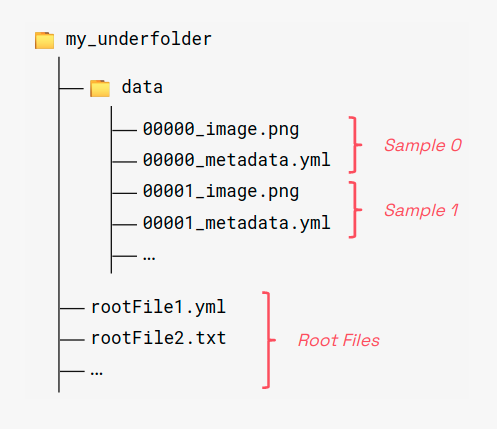
Any valid underfolder dataset must contain a subfolder named data with samples and items. Also, global shared items can be stored in the root folder. All items are stored as separate files, with a specific naming rule:
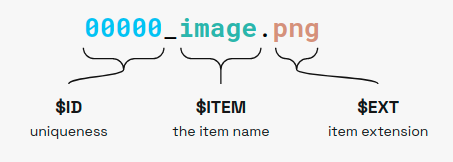
Where:
$IDis the sample index, must be a unique integer for each sample.ITEMis the item name.EXTis the item extension.
We currently support many common file formats and others can be added by users:
.png,.jpeg/.jpg/.jfif/.jpe,.bmpfor images.tiff/.tiffor multi-page images and multi-dimensional numpy arrays.yaml/.yml,.jsonand.toml/.tmlfor metadata.txtfor numpy 2D matrix notation.npyfor general numpy arrays.pkl/.picklefor picklable python objects.binfor generic binary data
Root files follow the same convention but they lack the sample identifier part, i.e., $ITEM.$EXT