Piper
In the previous section we talked about commands you can run from the command line.
A really special pipelime command is run, which executes a DAG (Directed Acyclic Graph) of commands using the Piper engine.
From Wikipedia:
a directed acyclic graph (DAG) is a directed graph with no directed cycles. That is, it consists of vertices and edges (also called arcs), with each edge directed from one vertex to another, such that following those directions will never form a closed loop.
Here, the nodes are pipelime command to execute, while the edges are matched input/output ports.
Piper takes as input any field having a key piper_port set to PiperPortType.INPUT and
as output any field having a key piper_port set to PiperPortType.OUTPUT.
Then, it compares inputs and outputs by converting them to string.
For example, InputDatasetInterface and OutputDatasetInterface are converted to their input and output folder paths, respectively.
Now let’s see how to use it:
$ pipelime run help
>>>
━━━━━ Pipelime Command
╭───────────────────────────────────────── run ──────────────────────────────────────────╮
│ (                                                                                      │
│   *,                                                                                   │
│   nodes: Mapping[str, Union[pipelime.piper.model.PipelimeCommand, Mapping[str,         │
│ Union[Mapping[str, Any], None]]]],                                                     │
│   include: Union[str, Sequence[str], None] = None,                                     │
│   exclude: Union[str, Sequence[str], None] = None,                                     │
│   token: Union[str, None] = None,                                                      │
│   watch: Union[bool, None] = None                                                      │
│ )                                                                                      │
│                                                                                        │
│ Executes a DAG of pipelime commands.                                                   │
│                                                                                        │
│   Fields        Description            Type                   Piper Port     Default   │
│  ━━━━━━━━━━━━━━━━━━━━━━━━━━━━━━━━━━━━━━━━━━━━━━━━━━━━━━━━━━━━━━━━━━━━━━━━━━━━━━━━━━━━  │
│   nodes / n     ▶ A DAG of commands    Mapping[str,           📥 INPUT       ✗         │
│                 as a `<node>:          Union[pipelime.piper                            │
│                 <command>` mapping.    .model.PipelimeComma                            │
│                 The command can be a   nd, Mapping[str,                                │
│                 `<name>: <args>`       Union[Mapping[str,                              │
│                 mapping, where         Any], None]]]]                                  │
│                 `<name>` is `pipe`,                                                    │
│                 `clone`, `split`                                                       │
│                 etc, while `<args>`                                                    │
│                 is a mapping of its                                                    │
│                 arguments.                                                             │
│                                                                                        │
│   include / i   ▶ Nodes not in this    Union[str,             📐 PARAMETER   None      │
│                 list are not run.      Sequence[str], None]                            │
│                                                                                        │
│   exclude / e   ▶ Nodes in this list   Union[str,             📐 PARAMETER   None      │
│                 are not run.           Sequence[str], None]                            │
│                                                                                        │
│   token / t     ▶ The execution        str                    📐 PARAMETER   None      │
│                 token. If not                                                          │
│                 specified, a new                                                       │
│                 token will be                                                          │
│                 generated.                                                             │
│                                                                                        │
│   watch / w     ▶ Monitor the          bool                   📐 PARAMETER   None      │
│                 execution in the                                                       │
│                 current console.                                                       │
│                 Defaults to True if                                                    │
│                 no token is                                                            │
│                 provided, False                                                        │
│                 othrewise.                                                             │
│                                                                                        │
│                                                                                        │
╰────────────────────────── pipelime.commands.piper.RunCommand ──────────────────────────╯
The nodes parameter is a mapping where the keys are node names, i.e., any unique string, and the values are the pipelime commands to execute.
Such commands can be specified as python objects, e.g., using the $model directive, or, simply, by their title and arguments. For example:
nodes:                              # ☚ The "nodes" argument of the "run" command
  good_split:                       # ☚ The title of the command to execute
    # ☟ the arguments of the command
    split-query:
      input: $var(input)            # ☚ this is a variable to be defined in the context
      output_selected: $tmp(good)
      query: "`metadata.label` == 'good'"
      grabber:
        num_workers: $var(nproc)    # ☚ another variable
  bad_split:                        # ☚ another command
    split-query:
      input: $var(input)
      output_selected: $tmp(bad)
      query: "`metadata.label` == 'bad'"
      grabber:
        num_workers: $var(nproc)
  good_train_test:
    split:
      input: $tmp(good)             # ☚ this is linked to "split-query.output_selected"
      splits:
        - output: $var(output)/train
          fraction: 0.8
        - output: $tmp(good_test)
          fraction: 0.8
      grabber:
        num_workers: $var(nproc)
  test_dataset:
    cat:
      inputs: [ $tmp(good_test), $tmp(bad) ]
      output: $var(output)/test
      grabber:
        num_workers: $var(nproc)
In the configuration above, we have a DAG with 4 nodes and some Choixe variables.
To get a usable DAG, these variables must be defined in the associated context.
To this end, just run pipelime audit as shown before.
For example, a possible context might be:
input: path/to/input
nproc: '6'
output: path/to/output
Also, remember that context options can be override from the command line using the @ syntax.
To visualize what the DAG will do, we can draw it:
pipelime draw -c dag.yaml --context context.yaml
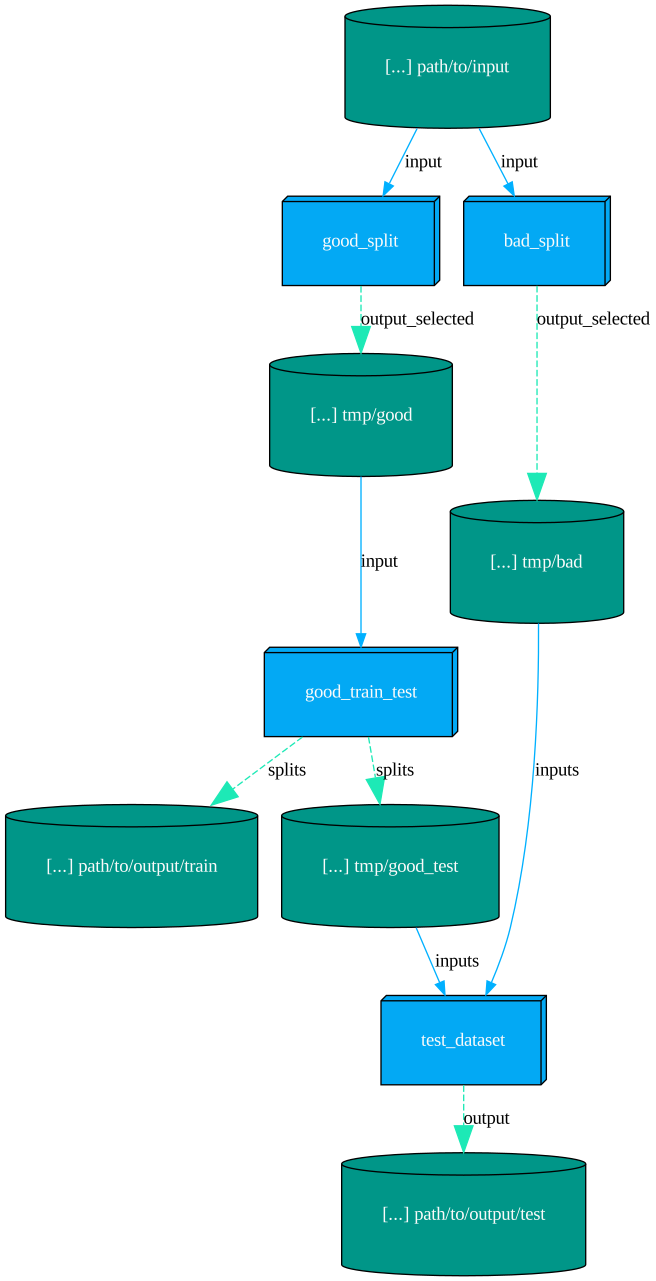
Now we are ready to run the DAG. A few options are available:
include/exclude: only nodes listed inincludeand not inexcludeare run. If not specified, all nodes are run.watch: ifTrue, the execution is monitored in the current console, otherwise you need to register your own listener.token: the execution token to be used to identify this run when monitoring it. If not specified, a new token is generated.
If you don’t need advanced broadcasting features, you can just ignore the token option and leave watch to True.
Otherwise, you can follow the execution from a different console using the pipelime watch command:
$ pipelime watch -t <token>