Piper Graph Execution
In the previous section we talked about commands you can run from the command line.
A really special pipelime command is run, which executes a DAG (Directed Acyclic Graph) of commands using the Piper engine.
From Wikipedia:
a directed acyclic graph (DAG) is a directed graph with no directed cycles. That is, it consists of vertices and edges (also called arcs), with each edge directed from one vertex to another, such that following those directions will never form a closed loop.
Here, the nodes are pipelime command to execute, while the edges are matched input/output ports.
Piper takes as input any field having a key piper_port set to PiperPortType.INPUT and
as output any field having a key piper_port set to PiperPortType.OUTPUT.
Then, it compares inputs and outputs by converting them to string.
For example, InputDatasetInterface and OutputDatasetInterface are converted to their input and output folder paths, respectively.
Now let’s see how to use it:
$ pipelime run -vh
The nodes parameter is a mapping where the keys are node names, i.e., any unique string, and the values are the pipelime commands to execute.
Such commands can be specified as python objects, e.g., using the $model directive, or, simply, by their title and arguments. For example:
nodes:                              # ☚ The "nodes" argument of the "run" command
  good_split:                       # ☚ The title of the command to execute
    # ☟ the arguments of the command
    split-query:
      input: $var(input)            # ☚ this is a variable to be defined in the context
      output_selected: $tmp(good)
      query: "`metadata.label` == 'good'"
      grabber:
        num_workers: $var(nproc)    # ☚ another variable
  bad_split:                        # ☚ another command
    split-query:
      input: $var(input)
      output_selected: $tmp(bad)
      query: "`metadata.label` == 'bad'"
      grabber:
        num_workers: $var(nproc)
  good_train_test:
    split:
      input: $tmp(good)             # ☚ this is linked to "split-query.output_selected"
      splits:
        - output: $var(output)/train
          fraction: 0.8
        - output: $tmp(good_test)
          fraction: 0.2
      grabber:
        num_workers: $var(nproc)
  test_dataset:
    cat:
      inputs: [ $tmp(good_test), $tmp(bad) ]
      output: $var(output)/test
      grabber:
        num_workers: $var(nproc)
In the configuration above, we have a DAG with 4 nodes and some Choixe variables.
To get a usable DAG, these variables must be defined in the associated context.
To this end, just run pipelime audit as shown before.
For example, a possible context might be:
input: path/to/input
nproc: '6'
output: path/to/output
Also, remember that context options can be override from the command line using the @ syntax.
To visualize what the DAG will do, we can draw it:
$ pipelime draw -c dag.yaml --context context.yaml
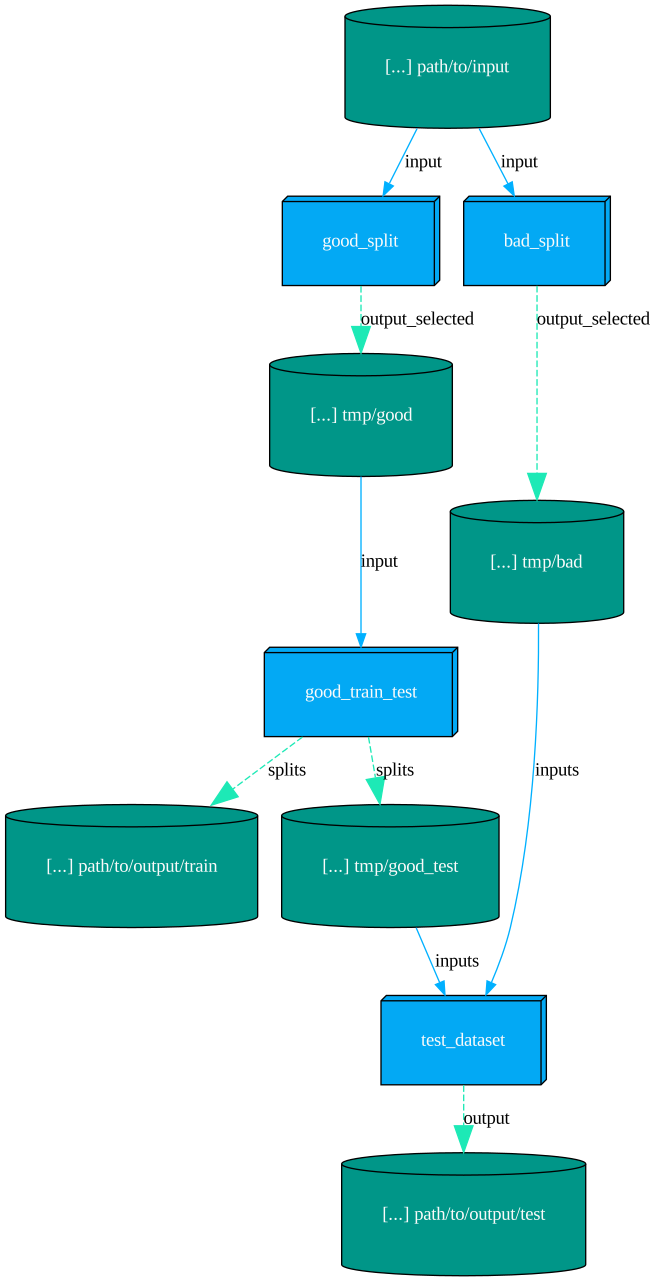
Now we are ready to run the DAG. A few options are available:
include/exclude: only nodes listed inincludeand not inexcludeare run. If not specified, all nodes are run.watch: ifTrue, the execution is monitored in the current console, otherwise you need to register your own listener.token: the execution token to be used to identify this run when monitoring it. If not specified, a new token is generated.
If you don’t need advanced broadcasting features, you can just ignore the token option and leave watch to True.
Otherwise, you can follow the execution from a different console:
$ pipelime watch
Python DAG
The DAG can also be specified as a python object. For example, copy the following code in a file named megadag.py:
import pipelime.piper as piper
from pipelime.commands.interfaces import GrabberInterface, InputDatasetInterface
from pipelime.commands.piper import PiperDAG, piper_dag
from pathlib import Path
from pydantic import Field


@piper_dag
class MegaSplit(PiperDAG, title="mega-split"):
    """Splits good/bad samples and builds test/train datasets."""

    input: InputDatasetInterface = InputDatasetInterface.pyd_field(
        description="The input dataset to split.",
        piper_port=piper.PiperPortType.INPUT,
    )
    otest: Path = Field(
        description="The output test dataset.",
        piper_port=piper.PiperPortType.OUTPUT,
    )
    otrain: Path = Field(
        description="The output train dataset.",
        piper_port=piper.PiperPortType.OUTPUT,
    )
    grabber: GrabberInterface = GrabberInterface.pyd_field()

    def create_graph(self, folder_debug):
        import pipelime.commands as plc

        good_split = plc.SplitByQueryCommand.lazy()(
            input=self.input,
            output_selected=folder_debug / "good",
            query="`metadata.label` == 'good'",
            grabber=self.grabber,
        )
        bad_split = plc.SplitByQueryCommand.lazy()(
            input=self.input,
            output_selected=folder_debug / "bad",
            query="`metadata.label` == 'bad'",
            grabber=self.grabber,
        )

        good_train_test = plc.SplitCommand.lazy()(
            input=good_split.output_selected,
            splits=[
                {"output": self.otrain, "fraction": 0.8},
                {"output": folder_debug / "good_test", "fraction": 0.2},
            ],
            grabber=self.grabber,
        )
        test_dataset = plc.ConcatCommand.lazy()(
            inputs=[
                good_train_test.splits[1]["output"],
                bad_split.output_selected,
            ],
            output=self.otest,
            grabber=self.grabber,
        )

        return [good_split, bad_split, good_train_test, test_dataset]
The piper_dag decorator above creates a new pipelime command class tailored for
running your DAG. Indeed, running pipelime -m megadag list will show the new
mega-split command, while pipelime -m megadag -h mega-split will show its arguments:
include,exclude,watch,token,force_gc: as in classic yaml dagsdraw: draw the graph and exitfolder_debug: a special folder where to store the debug data (see below)properties: a pydantic model with the fields you defined for your DAG
The properties argument can be exploded with the verbose
pipelime -m megadag -hvv mega-split or the more concise:
$ pipelime -m megadag -hv megadag.MegaSplit.PropertyModel
As you can see, the context variables of the previous example are now fields of the
pipelime command. Therefore, they can be set as + arguments or in a config file.
You may have noticed that we did not use the OutputDatasetInterface for the two output
datasets, but just Path instead. The reason is two-fold:
the user should not be able to choose an existing folder, nor how to serialize the data, since this is done automatically by the DAG
we do not want to check for the existence of the output folders before actually creating the output nodes, otherwise we would not be able to re-run some commands when resuming a successful DAG (see below)
Creating a DAG
The create_graph method is where you define the DAG. The return type might be either
a dictionary of nodes’ names and commands or just a list of commands (nodes’ names
will be auto-generated). You can use any PipelimeCommand class, including
RunCommand and other python DAGs, and you should set their fields through the lazy method,
otherwise checkpoints might not work properly (see below).
To connect nodes, just make sure that the input/output paths match. When you need to save
intermediate results, instead of manually creating a temporary folder, you should use
the folder_debug argument of create_graph. Indeed, when running the DAG, such folder
will be automatically created as temporary, but the user can decide to keep it for
debugging purposes by setting a custom path.
Finally, draw the graph to check that everything is ok:
$ pipelime -m megadag mega-split +p.input inf +p.otest ott +p.otrain otr +draw
Resuming A DAG From A Checkpoint
If you start a command with --checkpoint and the command is interrupted,
you can resume it by running:
$ pipelime resume +ckpt <checkpoint-folder>
Hint
The command resume wants +ckpt to restart another command using that checkpoint,
while --ckpt would be the checkpoint folder of the current command, ie, resume itself.
This is expecially useful when running a DAG, since the checkpoint remembers all the nodes that have been executed and their outputs. Moreover, you can add new options to the command line, for example to draw what remains to be executed:
$ pipelime resume --ckpt <checkpoint-folder> +draw
Warning
Beware that such options are appended to the original command line, so in general
if you repeat a + option it will not be overwritten, but interpreted as a sequence instead.
Warning
The original command line is saved as-is, so relative paths will still be relative.
A very special case are the include/exclude options when resuming a DAG,
since they overwrite the current state of the graph.
For example, if you run a graph with --keep-tmp or +folder_debug and
it succeeds, you can still re-run some of the nodes:
# first run
$ pipelime --ckpt ckpt -m megadag mega-split +folder_debug dgb +p.input inf +p.otest ott +p.otrain otr

# remove some intermediate outputs
$ rm -rf dbg/good dbg/bad

# re-run a couple of nodes
$ pipelime resume --ckpt ckpt +i split-query-0 +i split-query-1
Running A Subset Of Nodes
When you run any DAG, either yaml or python, you can always select just a subset of nodes to run. The relevant options here are:
includeexcludeskip_on_errorstart_fromstop_at
To fully understand how they work, we need to break down the DAG creation process:
the nodes are created, either from yaml or as python lazy commands
only the nodes which ARE in the
includelist and NOT in theexcludelist are transformed to full-fledged pipelime commandswhen creating a node, if
skip_on_errorisTrue, in case of a validation error the node is simply skipped, eg, if the output folder already existsall the nodes which do NOT descends from the nodes in the
start_fromlist are removedthen, all the nodes which are NOT ancestors of the nodes in the
stop_atlist are removed
Warning
If stop_at is a node which do not descends from any node in start_from, the DAG will be empty!
Tip
Before running a subgraph, you can draw it to check that everything is ok.